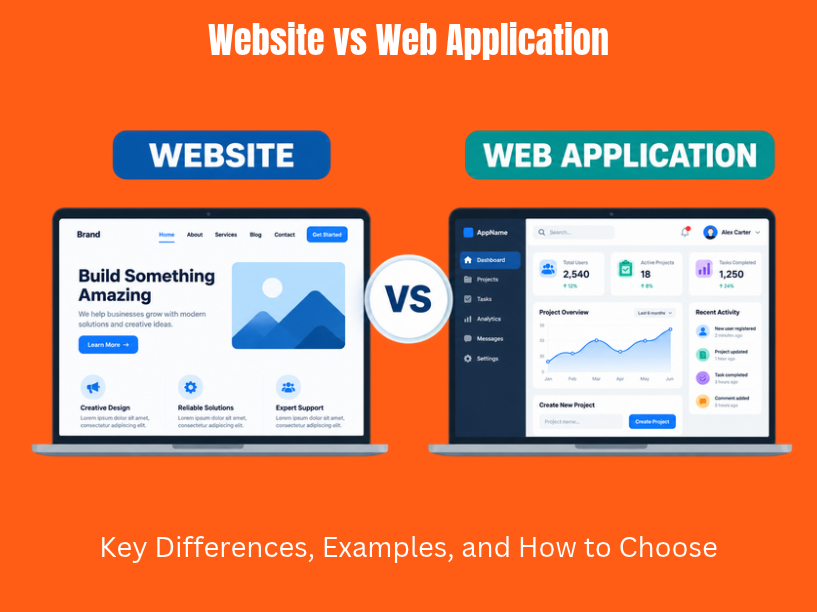
Both websites and web applications run inside a web browser, but they serve different business goals. A website delivers information to visitors. A web application lets users interact with data, complete specific tasks, and manage workflows. The difference between a website and a web application shapes every decision you make about technology, budget, and team structure.
This article answers two questions directly: What separates a website from a web app? And which should your business build first?
In 2026, most successful digital products blend both. A SaaS company, for example, runs an informational marketing site alongside a logged-in dashboard where customers manipulate data and track results. Many successful digital products start as websites and evolve into web applications as user needs grow.
TVL IT Solutions is a custom software development partner that designs and builds both websites and web applications, with deep expertise in backend and frontend engineering and scalable architecture. The sections below cover concise definitions, key differences, real-world examples, and selection criteria for startups, SMEs, and enterprises.
A website is a collection of related web pages, interlinked web pages under a single domain, identified by a uniform resource locator. Its purpose is displaying content: text, images, video. Visitors consume that content in a largely one-way flow. Websites primarily aim to present information without requiring users to create accounts or submit complex data. A website communicates information while a web application enables users to accomplish tasks.
A web application is a software application delivered through a browser that lets users log in, create, edit, and manage data in real time. Web apps replace or complement desktop software and native apps for productivity tools, project management, and financial tracking. Websites inform or entertain while web applications perform tasks and process data.
Both use core web technologies: hypertext markup language (HTML), CSS, and JavaScript. Web apps add application logic, databases, server side processing, and richer user interaction on top of that foundation.
Quick contrast:
A website’s main purpose is delivering content to visitors. Static websites serve the same web pages to every user. Most websites consist of multiple static pages organized in a clear hierarchy: Home, About, Services, Blog, Contact, and FAQs. Visitors navigate by clicking links rather than performing complex workflows.
Websites can be built using basic HTML, CSS, and JavaScript. Many site owners create websites using a content management system like WordPress or a website builder with a visual editor. Some modern websites pull dynamic content from APIs or a headless CMS, but they still don’t let visitors manipulate data or run personalized workflows.
Websites are optimized for search engines, load speed, and conversion paths like contact forms and newsletter signups. A B2B consulting firm’s own website, for example, might publish case studies, team bios, and a blog for organic traffic. It collects leads through a form but offers no authenticated dashboard.
Key traits of websites:
A web application is interactive software delivered through a browser that lets users perform specific tasks: managing finances, collaborating on documents, tracking shipments, or running reports. Web applications allow users to perform complex tasks interactively, and they handle real-time data processing and interactions.
The core distinction is two-way communication. Users submit user input through forms, filters, and interactive elements. The app processes that input via server side technologies, queries a database, applies business logic, and returns personalized responses. Web apps provide personalized user experiences through account sign-ins, meaning the interface adapts to each user’s role and data.
Web apps use advanced javascript frameworks like React and Angular for frontend interfaces. On the backend, web apps require server side technologies like Node.js or Django, and they often use databases like MySQL or PostgreSQL to store data. Web apps require both frontend and backend development, which is why they need multiple developers across disciplines.
Concrete examples: google docs for document editing, Trello and Jira for project management, Slack’s web client for team messaging, and online banking portals. These are all examples of web applications including online document editors and project management software.
Defining features of web apps:
At TVL IT Solutions, web app development projects often involve scalable architecture, security-first development, and integration with AI/ML, Microsoft Dynamics, or Salesforce.
The key differences between websites and web apps fall across seven dimensions. Choosing between a website and a web application often depends on user interaction needs and the complexity of what users must accomplish online.
These differences sit on a spectrum, not a strict binary. Online stores, for instance, blend a product catalog (website) with a shopping cart and checkout flow (web app). Membership platforms combine public content with private dashboards.
This distinction matters for planning. A brochure website needs a designer, a CMS, and simple hosting. A web application needs frontend engineers, backend developers, QA, DevOps, and ongoing security reviews.
Purpose. A website exists to attract and inform. A product marketing page walks visitors through features, pricing, and testimonials in a linear flow. A web application exists to retain and enable. An internal procurement web app, by contrast, guides employees through multi-step purchase approvals with form validation, role-based views, and audit trails.
Interactivity. Interactivity websites offer is limited: scrolling, clicking links, filling a contact form. Web applications allow users to perform interactive tasks like editing spreadsheets, dragging cards across a board, or configuring complex reports. Choose a web app for personalized user interaction and data processing. Choose a website for one-way communication needs.
User experience. Websites optimize for clarity, storytelling, and conversion. Metrics focus on sessions, bounce rate, and leads. Web applications optimize for efficiency and low-friction task completion. Metrics track feature adoption, cohort retention, and task completion time.
Design implications follow the same split. Websites prioritize brand visuals, typography, and content layout. Web apps prioritize user interface state management, error handling, loading indicators, and accessibility for users who spend hours inside the application each day. A web app’s user interface must handle edge cases that a marketing page never encounters: failed saves, concurrent edits, permission errors.
Both websites and web applications share core web technologies, but web apps require a richer technology stack to support complex functionality, data persistence, and custom functionality.
Typical website stack:
Typical web app stack:
A technology stack choice affects scalability, performance, security, and long-term maintainability. Web applications tend to require programming languages and frameworks across both client and server, while most websites run on a CMS with minimal custom code.
TVL IT Solutions designs technology stacks based on business goals. A startup validating a concept may need a simple marketing site plus a lean MVP. An enterprise launching a multi-tenant SaaS platform needs microservices, event-driven architecture, and robust data pipelines. Infrastructure tooling like CI/CD and containerization is more critical on the web application side, where web apps run through automated deployment workflows.
Authentication and data handling are where the difference between a website and a web application becomes visible immediately. Most websites are largely public. A visitor reads content without logging in, and the site collects limited data: a name and email via a contact form, or analytics cookies.
Web applications center on user accounts. Users log in with passwords, SSO, or multi-factor authentication. The app assigns roles and permissions that control what each person sees and does. A patient portal web app, for example, displays lab results, appointment history, and prescription data; the hospital’s informational website, by contrast, lists department hours and physician bios.
Security implications scale with data sensitivity:
TVL IT Solutions applies a security-first development approach to web applications, including secure coding practices, regular code reviews, and zero-trust architecture patterns.
Scalability means handling more users, data, and features without degrading performance. Websites typically scale in traffic: more readers loading the same static pages. Caching, CDNs, and static generation solve this efficiently.
Web applications must scale both traffic and operations: more concurrent sessions, heavier business logic, growing databases, third-party integrations, and real-time event processing. A web server handling 10,000 simultaneous authenticated sessions faces different challenges than one serving 10,000 cached HTML pages.
Maintenance differences are equally pronounced. Website maintenance can often be automated for plugins and themes. Content updates, design refreshes, and CMS patches happen in periodic batches. Web application maintenance is more extensive than website maintenance. Web apps require continuous attention for performance and security updates. Web applications need regular attention for back-end systems like databases, API versioning, and migration scripts. Maintaining a web app involves ensuring compatibility with dependent technologies like third-party APIs, SDK versions, and operating system updates on mobile devices.
Web apps follow an agile product lifecycle:
Websites follow a simpler cycle: design, build, launch, update content periodically.
TVL IT Solutions supports long-term maintenance through dedicated team models and strategic partnerships for complex web applications.
Classifying real products clarifies where websites and web apps sit on the spectrum:
Many businesses run both under one domain. User journeys move from website to web app: a visitor discovers content via search, signs up, and then works inside the application. Progressive web apps blur this boundary further; about 19.2% of sites now use service workers that enable offline support and push notifications, pushing websites toward app-like behavior. Some of these apps are also available on google play as installable packages.
The right choice depends on what users must do online, not on a technology label.
A website alone works when you need to:
A web application is necessary when you need to:
A common strategy: start with a website plus a basic MVP web app to test core functionality, then iterate toward a full platform. This lets you validate demand with content while proving your product concept with interactive components.
For non-technical founders: frame requirements as user stories and outcomes. Instead of “we need React,” say “our customers need to track shipment status in real time.” TVL IT Solutions helps translate those outcomes into architecture decisions, whether through dedicated teams for ongoing products, fixed-scope builds for clearly defined websites, or hybrid engagement models.
TVL IT Solutions is an offshore custom software development partner specializing in web development, mobile apps, game development, and enterprise solutions includingAI/ML, Microsoft Dynamics, and Salesforce.
The team helps clients decide between a website, a web app, or a hybrid by running discovery workshops, mapping user journeys, and defining technical requirements before writing a line of code.
High-level phases:
Engagement models (no pricing figures):
Every engagement prioritizes secure, scalable architecture and security-first development. Whether a client needs a simple marketing site or a multi-tenant SaaS platform with trending technologies, TVL IT Solutions designs for long-term growth.
A logistics startup in Europe launched in 2024 with a brochure-style website. The site described services, published a few blog posts for SEO, and collected leads via an email contact form. All booking and shipment tracking happened over phone calls and spreadsheets.
Within eight months, the company’s customer base grew beyond what manual processes could handle. Errors in order entry increased. Customers wanted self-service booking and real-time status updates on mobile devices and desktops.
TVL IT Solutions partnered with the startup to design a two-part solution:
The transformation replaced manual data entry with server side processing and structured database records. Customer onboarding time dropped. Support ticket volume around order status decreased because customers could self-serve. The startup now runs both its website and web app under the same domain, with an internet connection between the marketing experience and the product experience that moves visitors from content to conversion.
The core distinction holds: websites attract through content; web apps retain through utility. Websites display static content for passive consumption on the world wide web. Web applications let users perform specific tasks, from editing documents to managing supply chains.
In practice, most modern websites and web platforms blend both. Content draws visitors in. A web application keeps them engaged. The line between them continues to blur as progressive web apps add offline support, push notifications, and installability to what were once static pages.
When planning your next digital initiative, think in terms of user journeys and business outcomes rather than technical labels. Map what your users need to see, do, and accomplish. Then build the right combination of website and web app to support that journey.
If you need help clarifying your digital roadmap, TVL IT Solutions works with startups, SMEs, and enterprises to plan, design, and build secure, scalable web solutions. Reach out to start the conversation.
A website primarily provides information for visitors to read, while a web application allows users to interact with data, perform tasks, and manage workflows.
Examples of websites include informational business sites and news portals. Web applications include Google Docs, Trello, Jira, and online banking portals.
Generally, yes. Websites often use a CMS and simpler technology stack, while web applications require more complex frontend and backend development, databases, and ongoing security maintenance.
A business should consider a web application when it needs customer portals, user accounts, custom functionality, real-time data, subscription-based tools, or automated internal workflows.
Yes. Many businesses combine a public-facing website for marketing and information with a web application for interactive features such as customer accounts, order tracking, shopping carts, and dashboards.
At TVL IT Solutions, we specialize in delivering scalable, secure, and custom software development services tailored to your unique business needs. Whether you’re a startup or an enterprise, our team is ready to turn your vision into reality.
Get Started Now