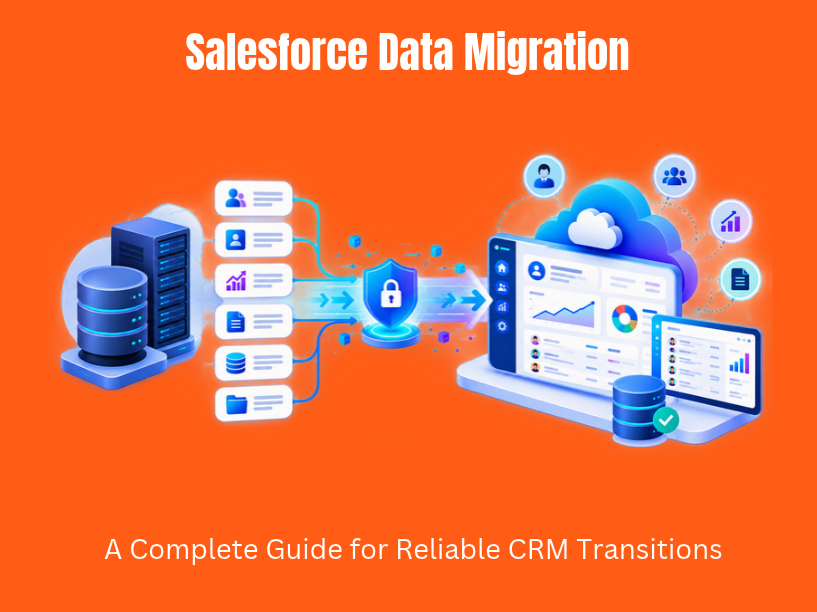

Salesforce data migration is the end-to-end process of moving customer, sales, service, and marketing data from legacy CRMs, spreadsheets, databases, or other Salesforce orgs into a target Salesforce org. The process covers extraction, transformation, cleansing, field mapping, loading, and validation, all while preserving relational integrity and historical records.
Between 2024 and 2026, this work has accelerated. Organizations are retiring on-premise CRMs as vendor support ends, consolidating Salesforce orgs after mergers, and responding to stricter compliance requirements under GDPR, CCPA, and HIPAA. Salesforce itself is investing heavily in its Data Foundation, projecting approximately $10B in revenue from data-related branches. A structured approach is essential for successful data migration into Salesforce, because the core challenges remain persistent: data complexity, poor data quality, scattered data sources, and resource constraints within internal teams.
This guide walks through practical steps, data migration best practices, and tool choices, written from TVL IT Solutions’ experience delivering Salesforce projects for startups, SMEs, and enterprises. The goal: help you plan and execute a low-risk, business-ready salesforce migration that preserves history and supports growth.
Three terms come up repeatedly in these projects, and they mean different things.
Data migration covers the full cycle: extracting existing data from source systems, transforming and cleansing it, mapping fields, and loading it into Salesforce. This includes large datasets with multi-year history, complex data models, and deep object relationships.
Data import refers to smaller, one-time loads. The Salesforce Data Import Wizard, for example, handles up to 50,000 records per import for standard objects like Leads, Contacts, and Accounts. Importing data at this scale skips most of the relational complexity a full migration demands.
Cloud migration goes beyond data. It includes metadata and configuration work: custom objects, custom fields, automation rules, page layouts, and integrations. When a company moves from an on-premise SQL Server CRM to Salesforce Sales Cloud, that is cloud migration.
The Salesforce editions and clouds involved matter for data structures and data volume. Sales Cloud, Service Cloud, and Experience Cloud each have specific objects and licensing models. Salesforce provides a centralized hub for customer information, streamlines workflows with automation (reducing manual tasks), and turns raw data into actionable insights through advanced analytics. Migrating to Salesforce can improve customer experience because it supports scalability and adaptability for growing businesses.
TVL IT Solutions operates as a Salesforce and custom software development partner, handling both data and application migration as part of broader digital transformation.
Few organizations migrate for fun. They do it because of concrete business events.
Replacing aging systems. Companies running Oracle, SAP, or Microsoft Dynamics on-premise are replacing legacy systems as vendor support ends. One documented case from 2025 involved an enterprise moving from SAP to Salesforce, requiring phased migration of both transactional and master data with full compliance alignment.
M&A and org consolidation. After mergers, companies consolidate regional Salesforce orgs. A Fortune 1000 company completed a salesforce organization segmentation in roughly 60 days, using incremental lift-and-shift of data hierarchies and metadata with minimal user disruption. Merging an EMEA Sales Cloud org and a North American org into one global destination org with standardized salesforce objects and fields is a common pattern.
Operational shifts. Launching a new subscription product in 2026 may require new data objects (Orders, Renewals, Billing) that the previous CRM never supported. Teams moving away from spreadsheets and flat files into a unified crm solution also fall into this category.
These triggers shape scope, timelines, and effort. TVL IT Solutions runs scoping workshops at the start of every migration project to map these drivers to concrete business data requirements and timelines.
Planning is the most time-consuming phase, and it should be. For medium-sized orgs (50K to 1M records), allow 2 to 3 months before production cutover. For large orgs with tens of millions of records across multiple source systems, plan 4 to 6 months.
Identify data to migrate before starting the process. Decide which standard and custom objects are in-scope: Leads, Accounts, Contacts, Opportunities, Cases, Campaigns, contract record types, custom billing objects. Decide which legacy objects will be excluded or archived.
Not every record deserves migration. Determine which records are still relevant: active customers, open deals, Cases from the last 24 months. Older closed cases or inactive contacts can stay in an external archive or a data warehouse.
Engaging business stakeholders early in the migration process helps avoid incomplete requirements. Sales, service, marketing, and finance teams must define what business data they use daily vs. what is historical reference. TVL IT Solutions typically runs structured discovery workshops with each department to finalize the migration plan backlog, covering objects, historical periods, and interdependencies.
Modern migrations rarely have a single clean source. Data comes from a mix of legacy CRM databases, ERP systems, marketing platforms, and Excel or CSV files scattered across SharePoint, Google Drive, and email inboxes.
Start by listing every source system. Common ones include Microsoft Dynamics 365, Zoho CRM, on-premise SQL databases, Oracle, and flat files. Each has its own schema, data types, and master identifiers. Legacy systems may use incompatible data structures, which surfaces during this inventory step.
Data mapping ensures source data aligns with Salesforce structure. Map source fields (“Cust_ID” in SQL, “CustomerNumber” in a CSV) to Salesforce object fields (Account.External_ID__c, Contact.Email). Include data types, transformations (converting date formats from dd-mm-yyyy to yyyy-mm-dd), picklist translations, time zone adjustments, and default values for missing data points.
A detailed Data Mapping Document is necessary to link legacy source fields to target fields in Salesforce. This document records field-by-field mappings, transformation logic, sample values, and whether each field is required or optional. TVL IT Solutions assigns clear ownership for mapping review and sign-off to avoid ambiguity.
Data complexity increases with deep relationship chains: Account → Contact → Opportunity → Quote → Order → Invoice. Many-to-many relationships managed via junction objects (like OpportunityLineItems connecting Accounts and Products) add another layer. Attachments, files, Activities, and Chatter posts all require separate handling. Data mapping complexities increase with larger datasets, so investing in a thorough mapping document pays off during every subsequent phase.
Data templates are standardized CSV or Excel layouts built for each target Salesforce object. A Contact template, for example, would include columns for FirstName, LastName, Email, AccountId (as an external ID reference), and RecordTypeId. Create data templates for each object type, and include sample rows with formatting notes.
Start from Salesforce’s field metadata samples for each object. Pull required fields, exact API names, and field-level constraints. Add columns for the unique identifier or external ID that will link records to their parents. Create templates for each object to streamline migration and reduce manual errors.
Execute the data load in logical steps starting with parent objects to maintain relationships during migration. A proven sequence:
Loading child records before their parents exist in the target system breaks lookup relationships and creates orphaned data.
These data templates become reusable assets. When a future org merge, incremental load, or database migration happens, the same templates apply with minor adjustments. TVL IT Solutions often automates template population from source databases using ETL scripts, especially when data volume exceeds a few hundred thousand records.
Poor data quality is the top reason migrations fail or erode stakeholder trust. Data quality issues can lead to migration failures, and cleaning data pre-migration often requires more time and effort than the actual migration itself.
Perform data cleansing to remove duplicates before migration. Data cleansing removes duplicates and outdated records before migration, using matching rules by domain, tax ID, or a unique identifier. Audit and cleanse legacy data to remove duplicates and formatting inconsistencies prior to migration. Standardizing data formats and ensuring mandatory fields are filled is crucial during data cleansing.
Use data profiling tools to identify anomalies at scale. Standardize picklist values, country and state codes, and phone number formats. Backfill or generate external IDs when the source system lacks stable unique keys; natural keys like email, domain, or tax ID work when synthetic IDs do not exist.
Business teams decide what to keep vs. archive. TVL IT Solutions or the internal IT team performs automated cleansing and validation scripts in a sandbox before first test migrations. This collaborative loop catches issues that automated rules miss, like whether two “Acme Corp” records in different regions are the same company or separate legal entities.
Tool choice depends on data volume, complexity, and team skills. Using appropriate tools like Data Loader or Data Import Wizard depends on data volume and complexity. Configuring the target salesforce environment involves creating custom fields and record types before data import, regardless of which tool you pick.
Web-based, with an intuitive interface suited to non technical users. Salesforce Data Import Wizard uploads up to 50,000 records at once. Best for simple Leads, Contacts, Accounts, and custom objects imports where business users want a guided process without installing software.
A desktop client for serious migration work. Salesforce Data Loader handles up to 150 million records per object, supports insert, update, upsert, delete, and export operations. Salesforce recommends using Bulk API for larger migrations to avoid performance issues and API limits, and Data Loader integrates with Bulk API natively. This is the go-to for complex migrations involving large data volumes.
| Tool | Strength |
| Dataloader.io | Allows unlimited data imports and exports via a cloud-based interface |
| Skyvia | Supports transferring data between multiple Salesforce orgs |
| Jitterbit Data Loader | Simplifies data import and export processes (retired November 2025; teams using it should switch) |
| SFDX Data Move Utility | Developer-led org-to-org moves via CLI |
| MuleSoft / Informatica | Advanced scheduling, transformation, logging for enterprise data integration |
TVL IT Solutions evaluates third party tools case-by-case based on security, logging, scheduling features, and whether the team needs a cloud platform or desktop-based approach.
Guideline: Use Import Wizard for small, business-owned loads. Use the data loader or ETL tools for bulk, multi-object migrations where robust error handling and repeatability are required.
This section is a practical walkthrough that a project manager or Salesforce admin can follow using sandboxes and production orgs.
Mirror the production metadata, permissions, validation rules, and automation in a Full Copy or Partial Copy sandbox. This is the target salesforce org for testing. Verify that all custom objects, custom fields, and record types exist before loading anything.
Conduct a pilot migration to identify potential issues. Perform pilot migrations in a sandbox environment to identify potential issues before production migration. Load a representative subset: 5,000 Accounts, their related Contacts, and a few hundred Opportunities. Validate relationships, ownership, and field accuracy. Fix mapping or cleansing problems before scaling up.
Load the full dataset (or a large chunk) including transactional records, attachments, and historical logs. Measure load times, API consumption, and error rates. This rehearsal surfaces problems that small pilots miss, like governor limits on custom triggers or workflow rules firing on bulk inserts.
Schedule the production migration during off-hours or a weekend. Enforce a change freeze: no new data enters the legacy system for in-scope objects during cutover. Communicate the freeze window to all teams well in advance. Having a rollback plan is crucial in case of migration failures; maintain backup snapshots of both source and target system data.
For 1 to 2 weeks after go-live, monitor error logs, validate integrations, and support users. TVL IT Solutions coordinates checkpoints, sign-offs, and rapid issue resolution during this window. Any failed rows from the migration process get re-ingested after root-cause fixes.
Migrate data in waves:
This sequence preserves parent-child relationships and avoids orphaned records in the new salesforce org.
Rigorous testing is the only way to prove data integrity and business readiness before switching users over. End-to-end testing is essential to minimize risks of migration failures.
Validation checks data integrity after migration is complete, catching issues like truncated text fields, misaligned picklist values, or broken lookup references.
User acceptance testing is a critical step to confirm that workflows and reports behave as expected after migration. Design UAT scenarios from real business workflows:
Use Salesforce sandboxes that mirror the production data model. Run at least one full migration rehearsal before production cutover. TVL IT Solutions prepares test scripts and checklists, pairing power users with Salesforce admins to quickly triage defects found during UAT.
A successful migration is measured not just on cutover day, but in the weeks and months after users adopt Salesforce.
Monitor error logs from the migration tool. Confirm that scheduled integrations (nightly syncs, API connections to ERP or marketing platforms) run correctly with new salesforce data. Spot-check records that end users report as missing or incorrect.
Establish a data governance strategy for post migration management. Define who owns which objects, how new records are validated on entry, and how duplicates are prevented. Salesforce’s native matching rules and duplicate rules catch new duplicates before they enter the system. Set up audit trails for regulated data.
Run monthly or quarterly data quality reviews. Build Salesforce reports and dashboards to monitor KPIs:
TVL IT Solutions often provides ongoing support for enhancements, additional integrations, and continuous optimization of data models as business needs evolve.
A poorly executed salesforce data migration can disrupt revenue, erode user trust, and violate compliance requirements. Common challenges in data migration include poor data quality and complex data relationships.
| Risk | Mitigation |
| Poor source data | Start data cleansing months before cutover |
| Broken relationships | Use incremental test loads; validate parent records before loading children |
| Undocumented transformations | Document every field mapping and transformation in the mapping document |
| No fallback | Maintain a clear rollback plan with full backups of source and target |
| User distrust | Communicate early, train users on changes, and involve them in UAT |
An experienced partner like TVL IT Solutions brings reusable templates, checklists, and lessons learned from migrations in regulated and high-volume environments, reducing the learning curve and the risks involved.
These lessons come from real client projects, not theory.
Migrate what you use. Define a clear data scope with a bias toward active, relevant records. A practical rule: prioritize the last 3 to 5 years of transactional data plus all active master data. Archive older history in a data warehouse or external storage rather than loading it into Salesforce, where it adds storage overhead and clutters user views.
Standardize everything. Create and maintain standardized data templates, naming conventions, and documentation. When templates follow consistent API naming and formatting, migrations become repeatable and auditable. This pays off during future incremental loads or org merges.
Pilot before you commit. Always run pilot migrations with a realistic subset of data and users. Iterate based on findings before attempting full loads. A pilot that surfaces 200 mapping errors saves weeks of production debugging.
Disable automation during loads. Turn off triggers, workflow rules, and validation rules that are not essential during migration. Re-enable them after data is loaded and verified. This prevents cascading errors and unintended side effects.
Embed migration in a broader roadmap. Align migration tasks with a digital transformation roadmap that includes custom software development, integrations, and AI/ML initiatives that TVL IT Solutions delivers around Salesforce. A successful salesforce data migration is one step in a larger strategy, not an isolated event.
A mid-sized B2B company with operations across three regions was running an on-premise CRM alongside multiple Excel trackers maintained by regional sales teams. Customer IDs were inconsistent: the European team used tax IDs, North America used auto-incremented database keys, and Asia-Pacific had no formal ID system at all.
Salesforce leadership set a goal: build a single global view of Accounts and Opportunities within six months, then integrate a new custom SaaS billing platform built by TVL IT Solutions.
TVL IT Solutions started with discovery workshops involving sales directors, service managers, and finance leads from each region. The team built data templates for Accounts, Contacts, Opportunities, and Cases, with a standardized external ID generated by combining region code and tax ID.
Migration proceeded in waves. Accounts and Contacts loaded first using the salesforce data loader, followed by Opportunities and Cases. Each wave ran through a Full Copy sandbox rehearsal before the actual migration to production.
Duplicate global customers appeared across regions: the same multinational client existed as three separate Accounts with different spellings. Automated cleansing scripts flagged duplicates by domain name and tax ID, and business owners made the merge decisions. Historical deals from the previous CRM were missing close dates on roughly 12% of records. TVL IT Solutions applied a business rule (defaulting to the last day of the fiscal quarter noted in the contract record) after sign-off from finance.
The seamless transition delivered a unified view of 45,000+ Accounts, improved pipeline reporting accuracy, and eliminated the weekly manual spreadsheet reconciliation that had consumed 6 hours per region. The company was ready to connect the new billing platform directly to the Salesforce data model, completing the data integration loop.
Salesforce data migration is not a technical exercise you survive and forget. It is the foundation for better sales forecasting, faster service resolution, and more targeted marketing. Every clean Account record, every properly linked Opportunity, every validated Case contributes to decisions that drive revenue.
The core themes hold across every migration project: thoughtful planning and data selection, careful data mapping and cleansing, smart use of tools like Data Loader and Data Import Wizard, and rigorous testing and governance. Moving data from a legacy system into a new salesforce org is only the beginning. The real value appears when teams trust the data enough to act on it.
Treat migrated salesforce data as a long-term strategic asset. It can power analytics, AI, and custom applications that grow with your business.
If your organization is planning a Salesforce migration, org consolidation, or broader cloud migration, TVL IT Solutions can help design a secure, scalable, and business-ready approach. Reach out to start a conversation about your migration goals.
Salesforce data migration is the process of extracting, cleansing, transforming, mapping, loading, and validating data from legacy systems into a Salesforce org.
The main steps include planning, data source inventory, field mapping, data cleansing, template creation, pilot migration, full migration rehearsal, production cutover, testing, and post-migration monitoring.
Common tools include Salesforce Data Import Wizard, Salesforce Data Loader, Dataloader.io, Skyvia, SFDX Data Move Utility, MuleSoft, and Informatica. Tool selection depends on data volume and migration complexity.
Data quality can be improved by removing duplicates, standardizing formats, validating mandatory fields, creating external IDs, profiling data, and performing repeated sandbox migrations before production cutover.
The timeline depends on data volume, complexity, number of source systems, and migration scope. The article suggests allowing around 2–3 months for medium-sized migrations and 4–6 months for large migrations involving multiple systems.
At TVL IT Solutions, we specialize in delivering scalable, secure, and custom software development services tailored to your unique business needs. Whether you’re a startup or an enterprise, our team is ready to turn your vision into reality.
Get Started Now